


Automated Client Onboarding with Google Forms and Google Drive.
August 19, 2025
2 min

This project automates the creation of Google Slides presentations using a template and data from a Google Sheet. It uses text replacement to personalize each presentation, saving time and ensuring consistency.
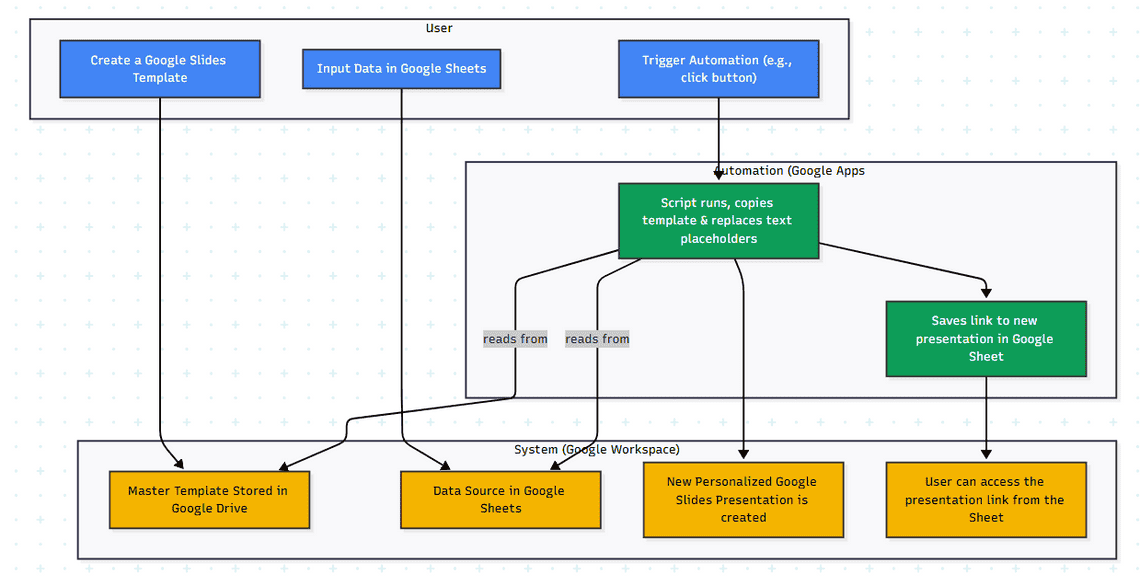
AI-Generated Diagram: Cross-Functional Flowchart for Automated Google Slides Generation
The Problem/Need/Why:
Creating presentations often involves repetitive tasks, like copying and pasting information and updating slides with new data. This process is time-consuming and prone to errors. This project automates these tasks, allowing users to quickly generate personalized presentations from a data source, ensuring accuracy and consistency while freeing up valuable time.
Create a Google Slides Template: The user creates a master presentation template with predefined text placeholders where data will be inserted.
Input Data in Google Sheets: The user enters the data needed to populate the presentation in a Google Sheet. Each row typically corresponds to a new presentation, with columns representing the different placeholders in the template.
Trigger Automation: The user clicks a button or triggers a function (e.g., via a custom menu or form submission) within the Google Sheet.
Generate Google Slides: A Google Apps Script runs, creating a copy of the template presentation. The script then uses the data from the active row in the Google Sheet to replace the corresponding text placeholders in the new presentation.
Save Presentation Link: The script saves a link to the newly generated Google Slides presentation in the Google Sheet (e.g., in a new column). This allows users to easily access and share their presentations.
Google Apps Script: Core automation logic for creating presentations, handling data, and integrating with Google services.
Google Slides API: Creating and manipulating Google Slides presentations.
Google Sheets API: Reading data from a Google Sheet.
Text Replacement/Templating: Dynamically populating presentations with user-provided data.
Workflow Automation & Efficiency Improvement: Streamlining the presentation creation process.
Time saved creating presentations.
Number of presentations generated using this system.
Any positive feedback received on the presentations.
Quick Links
Legal Stuff