


Automated Client Onboarding with Google Forms and Google Drive.
August 19, 2025
2 min

An automated system using Google Apps Script, Gmail API, and Gemini API to extract order details from Gmail emails (triggered by WordPress order submissions) and save them into a Google Sheet.
Manually processing incoming order emails from a WordPress website is time-consuming, prone to human error, and delays order fulfillment. There’s a need for an automated solution to efficiently extract order information from emails and organize it for further processing.
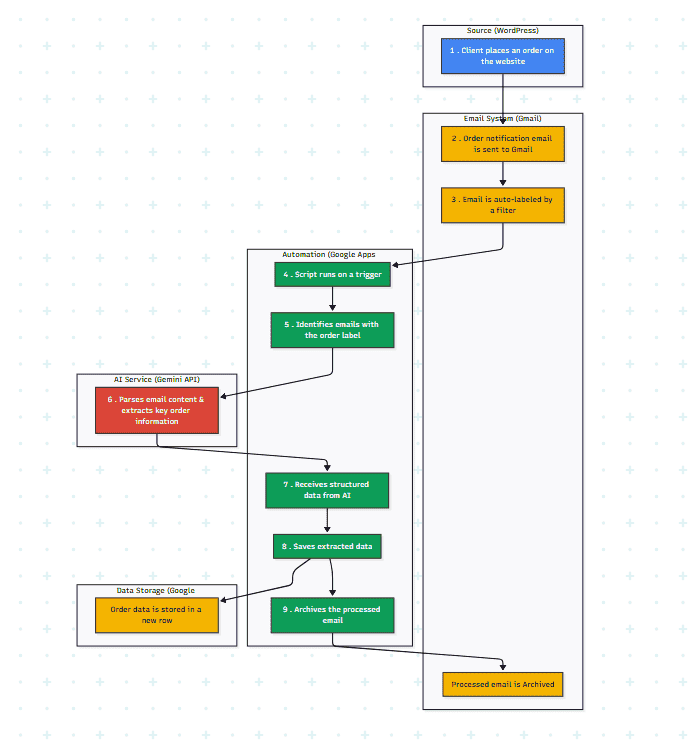
AI-Generated Diagram: Cross-Functional Flowchart for AI-Powered Order Processing Workflow
Client Order Placement: A client places an order through a WordPress website.
Email Notification: WordPress website automatically sends a new order notification email to a designated Gmail account.
Gmail Labeling (Initial Setup/Filters): Incoming order emails are automatically (or manually) assigned specific Gmail labels (e.g., ‘Green Collect/Product Order’, ‘Green Collect/Unite Order’).
Apps Script Trigger: A Google Apps Script, configured with a time-driven or event-driven trigger (e.g., new email arrival), automatically runs.
Email Identification & Extraction: The script identifies emails with the specified order labels.
Gemini API Integration: The Gemini API is used to parse the email content and extract key order information (e.g., Order ID, Customer Name, Product, Quantity, Order Date, Delivery Information).
Data Storage: The extracted order information is then saved into designated rows and columns within a pre-configured Google Sheet.
Archiving: Processed emails are automatically moved to an ‘Archived’ Gmail label to keep the inbox clean and organized.
Monitoring & Troubleshooting: Users can monitor the process through the Apps Script Execution Log and the Google Sheet for any errors or discrepancies. Regular testing and error monitoring are advised.
Google Apps Script
Gmail API
Gemini API
Google Sheets
WordPress (as the order source)
Data Extraction
Automation
Email Parsing
API Key Management
Google Cloud AI Studio
Reduced order processing time by 85% by automating data entry.
Decreased order entry errors by 90% compared to manual methods.
Enabled real-time visibility of incoming orders in a centralized Google Sheet.
Freed up 10 hours per week previously spent on manual order processing.
Seamless integration with Gmail and Google Sheets for efficient data management.
Quick Links
Legal Stuff